
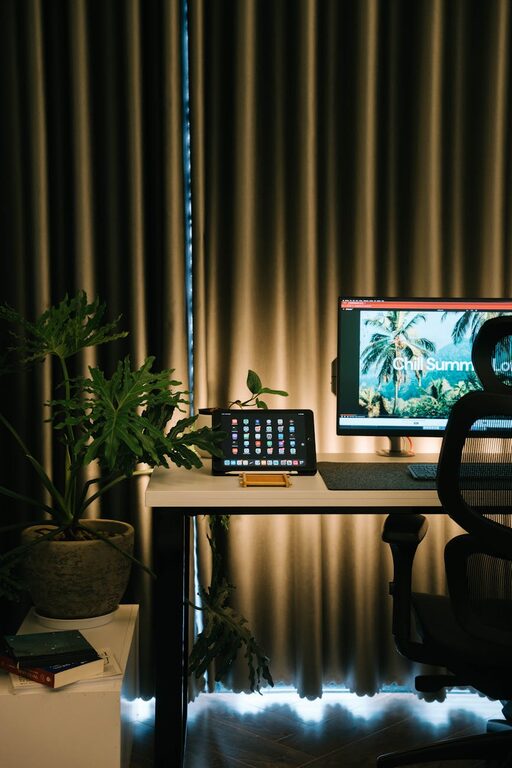
Creating a cosy and inviting home workspace is essential for maintaining focus, comfort, and motivation throughout your working day. Whether you work remotely full-time or need a spot for occasional tasks, designing a space that feels welcoming can enhance productivity and well-being.
In this post, we’ll explore helpful tips to create a home workspace that balances comfort with functionality, encouraging you to spend time there happily and efficiently.
—
Choose the Right Location
Picking the perfect spot for your workspace is the first step. Ideally, this should be a quiet area with minimal distractions.
– Natural Light: Near a window if possible, natural light can boost mood and energy.
– Away from Noise: Avoid busy areas like the kitchen or lounge to reduce interruptions.
– Dedicated Space: Even a corner of a room designated just for work helps set mental boundaries.
—
Invest in Comfortable Seating and Desk
Ergonomics matter hugely when it comes to both comfort and health.
– Ergonomic Chair: A supportive chair with adjustable height and good back support reduces strain.
– Appropriate Desk Height: Ensure your desk allows comfortable arm and wrist position.
– Footrest Option: Use a footrest if necessary to maintain good posture.
—
Add Personal Touches to Make it Inviting
Personalising your workspace makes it more enjoyable to spend time there.
– Plants: Indoor plants add colour, improve air quality, and create a calming atmosphere.
– Artwork or Photos: Hang pictures or place framed memories that inspire you.
– Soft Textiles: Cushions or a small throw can add warmth and texture.
—
Use Effective Lighting
Good lighting is crucial for both comfort and task performance.
– Layered Lighting: Combine natural light with overhead and task lighting.
– Desk Lamp: A focused desk lamp reduces eye strain when working on detailed tasks.
– Warm Light Bulbs: Opt for bulbs with warm tones to create a cosy feel.
—
Keep the Space Organised
An organised workspace reduces stress and helps you concentrate.
– Storage Solutions: Use shelves, drawers, or organisers to keep supplies tidy.
– Declutter Regularly: Remove unnecessary items daily to maintain a clean area.
– Cable Management: Use clips or ties to organise cables and keep surfaces clear.
—
Choose Calming Colours
Colour affects mood and focus, so choose tones that promote calm and concentration.
– Neutral Shades: Soft greys, beiges, or pastels create a soothing backdrop.
– Accent Colours: Use gentle hues like soft blues or greens to add interest without distraction.
– Avoid Overly Bright Colours: These might be energising, but can also cause visual fatigue.
—
Incorporate Technology Thoughtfully
Your technology setup should support your work without cluttering your space.
– Essential Devices Only: Limit gadgets to those you use daily.
– Wireless Options: Reduce cable mess with wireless keyboards, mouse, and headphones.
– Screen Position: Position your computer screen at eye level to prevent neck strain.
—
Make Time for Breaks
Your workspace should remind you to take care of yourself.
– Comfortable Spot for Breaks: Include a small armchair or cushions for stretching or relaxation.
– Reminder Tools: Use gentle timers or apps to encourage regular breaks from your desk.
– Inspiring Scents: Consider an essential oil diffuser with calming aromas like lavender or eucalyptus.
—
Maintain Good Air Quality
Fresh air and a comfortable temperature improve alertness and health.
– Ventilation: Open windows regularly or use an air purifier.
– Temperature Control: Ensure your workspace isn’t too hot or cold.
—
Final Thoughts
Designing a cosy and inviting home workspace doesn’t have to be complicated or costly. Paying attention to comfort, personal touches, organisation, and lighting can transform even a small corner into a productive haven. By carefully considering each element, you’ll create a space where you not only work efficiently but also enjoy spending your time.
Try these tips out and watch how your home workspace becomes your favourite room in the house for both focus and comfort.